
Marketing agencies · An Orchcast workflow
AI content marketing software for agencies
Give each client a separate brand workspace. Turn briefs into social, email, and blog drafts, then collect feedback and review revisions before publishing.
One client brand · No credit card required · Features and allowances vary by plan.
From first step to reviewed output
How it works
- Choose a client workspace and establish its voice, audience and approved brand rules.
- Turn a real client brief into channel drafts and supporting assets.
- Review the selected revisions with the people responsible for approval before publishing.
The free trial covers one client brand. Multiple workspaces and team approval features require an eligible paid plan.
A closer look
See the campaign brief before generation
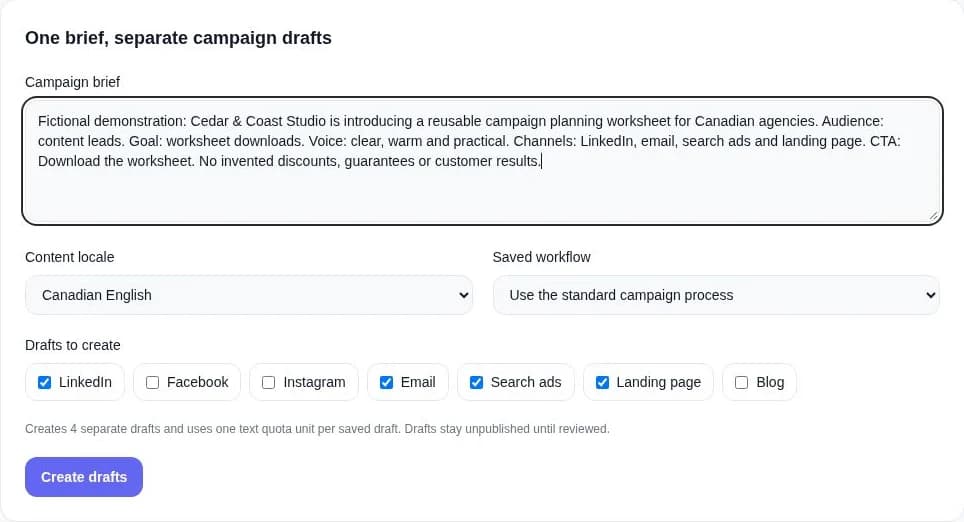
Walk through a small example
- Write one brief with the audience, goal, offer and call to action.
- Choose the locale and channel drafts; check the quota count.
- Create drafts, then edit and review the saved versions before activation.
Campaign Packs produces separate drafts. It does not automatically publish them or verify every factual claim.
Each saved draft uses a text quota unit. Available locales, tools and publishing connections depend on the workflow and plan.
The tools in this workflow
Brand Voice
Teach Orchcast how each client brand sounds.
See how it worksAgency Studio
Start with Agent Library, apply Brand Rules and prepare campaign evidence from saved materials.
See how it worksOrchcast Assistant
Find feature guides and ask product questions in Ask Orchcast.
See how it worksContent Board
Find, organize and review your saved content.
See how it worksPractical guides and worksheets
Questions about Marketing agencies
How can a marketing agency use AI for client content?
A marketing agency can train a voice for a client brand, turn an approved brief into channel drafts and review the selected revisions before publishing. Orchcast connects these steps so the team can reuse approved client context.
How do marketing agencies use Orchcast?
Choose a client workspace and establish its voice, audience and approved brand rules. Turn a real client brief into channel drafts and supporting assets. Review the selected revisions with the people responsible for approval before publishing.
Choose a real brief. Start with one brand.
Explore the workflow with your own content, review the results and decide what fits your team. Check pricing for current access, collaboration features and usage allowances.


